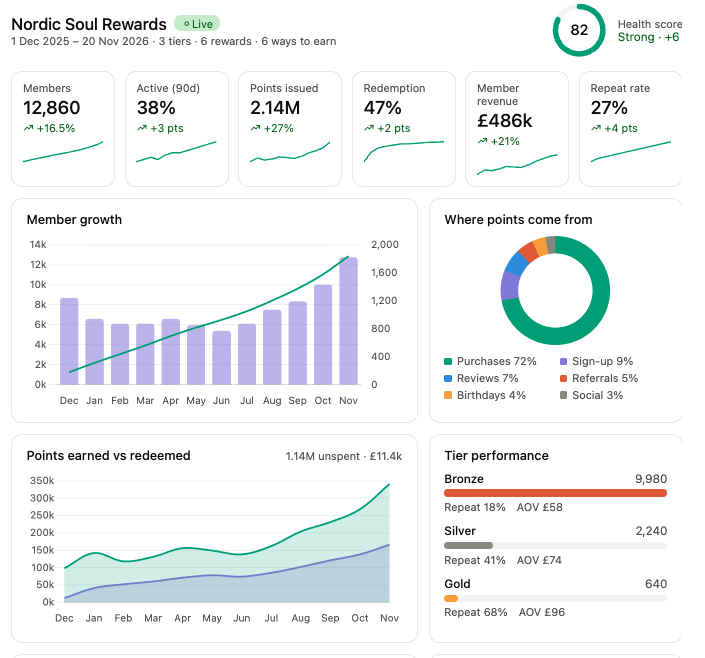
Your loyalty programme, in one clear view.
Ask your AI agent about membership, points, rewards and programme health. Bring your programme data into the conversation, then use it to decide what to explore next.
Explore AI loyaltyYour Shopify loyalty platform, now open to AI agents. Create rewards, plan campaigns and manage offers through Claude or ChatGPT.




Loyalty is free for up to 500 monthly orders. AI campaigns and MCP management from $9/month. See pricing
Let’s shape three tiers around your customers. I’ll outline earning rules and starter rewards, then bring the programme together for review.
Ask in your own words. Your assistant can use Thrivify’s connected merchant tools to explore it with you.
Your assistant can work with connected Thrivify tools to explore real setup options, organise a proposal and bring the decisions into view.
Ask your AI agent about membership, points, rewards and programme health. Bring your programme data into the conversation, then use it to decide what to explore next.
Explore AI loyalty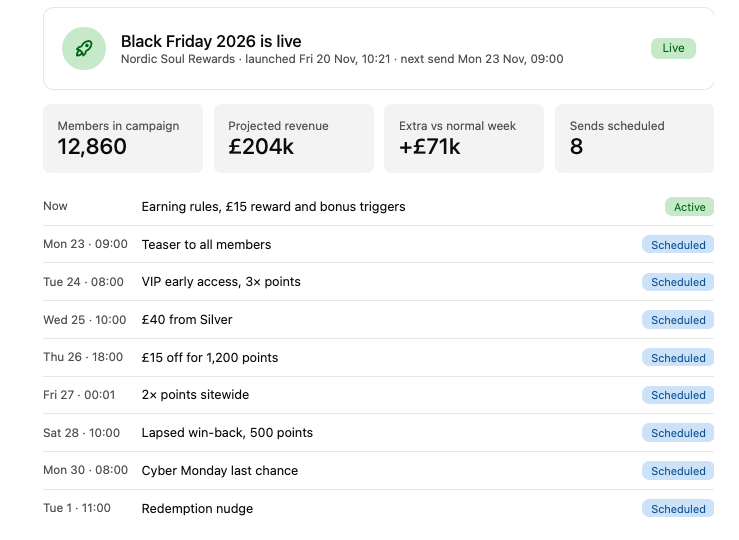
See the rules, rewards and scheduled activity together. Use your AI agent to explore campaign options and prepare changes for review, with the details in front of you.
Explore loyalty campaigns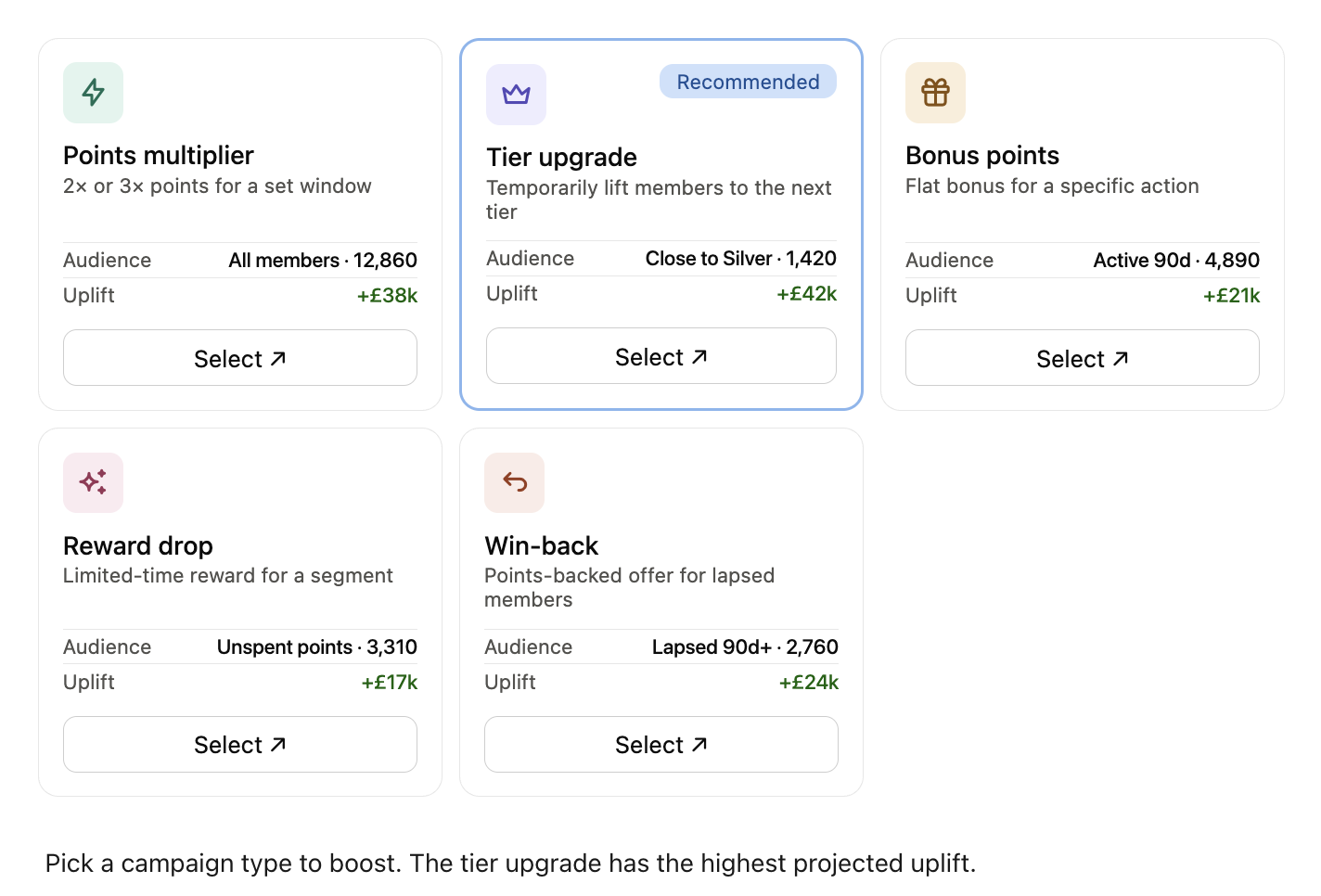
Use AI to shape a short campaign for a niche audience, beyond everyday earning rules. Consider a temporary tier upgrade for members close to their next tier, or a win-back offer for lapsed customers.
Explore AI loyalty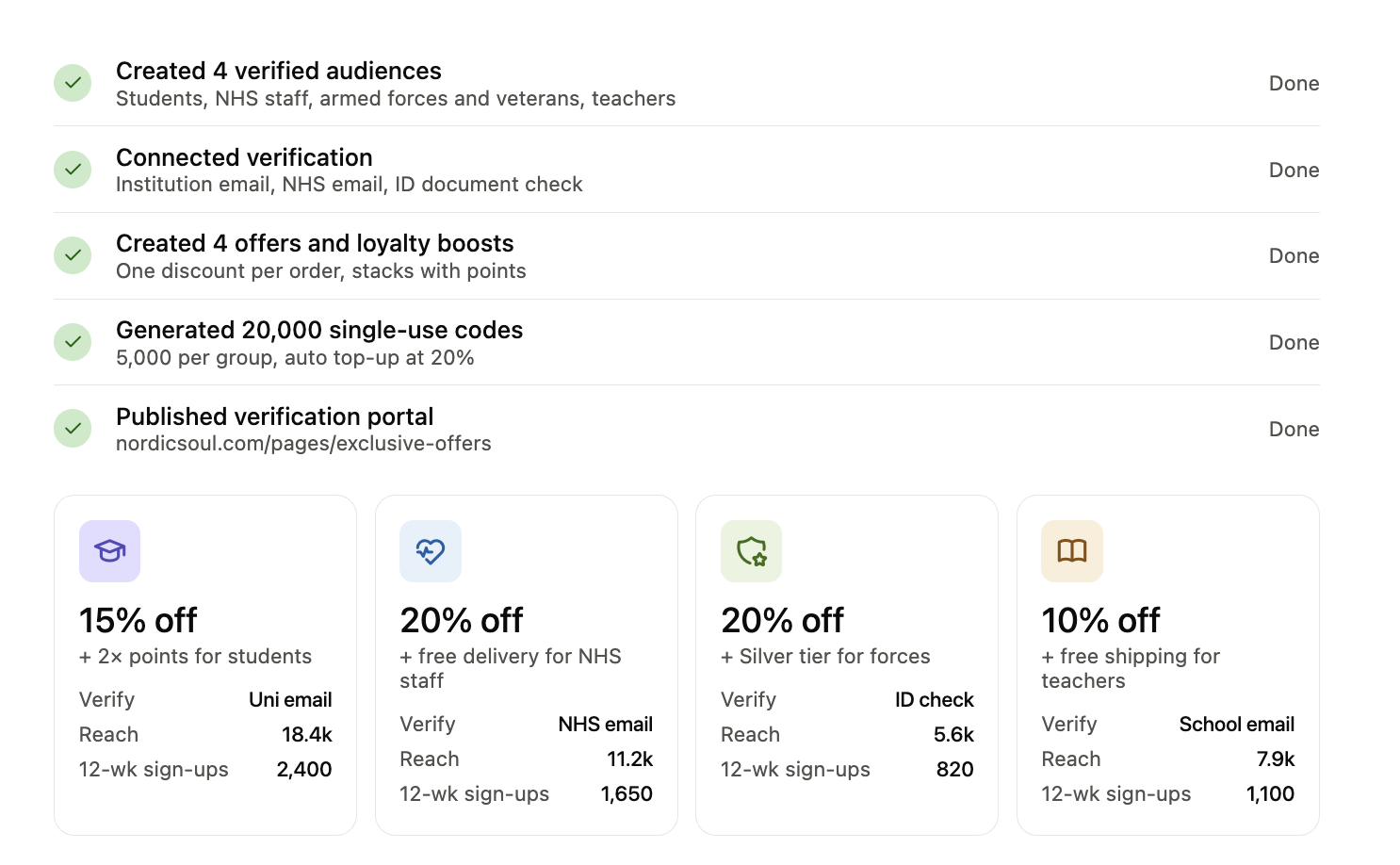
Prepare gated offers with branded portals and quizzes. Brand DNA is your library of approved brand imagery, ready to help the experience feel like it belongs in your store.
See verification offersMap your CSV or spreadsheet, check totals and examples, resolve errors and choose how existing members are handled. Your ledger stays intact while the import is reviewed.
Read the merchant guideConnect Thrivify to Claude or ChatGPT with a custom MCP connection. Your store’s tools, in a conversation you already know.
 What would you like to set up?
+ Loyalty programme+ Rewards
Loyalty, rewards, audience offers and member data. Your agent can read your connected store’s setup, explore available tools and help you understand programme activity before preparing changes.
ThrivifyYour assistant helps prepare and explain. You stay in the merchant seat, with access and approvals set up around your store.
Explore your programme and tools with read access.
Preview each change, then approve it as a store administrator.
New programmes start inactive. Review the setup and choose when to launch.
Get guided Shopify editor placement; review and save changes yourself.
Add Thrivify to your AI assistant, sign in and choose your store. Start with a read-only look at your programme.
Copy this server address into your assistant’s custom MCP connection settings.
https://api.thrivify.io/api/mcp/loyaltyThrivify is a Shopify loyalty platform. Model Context Protocol (MCP) lets AI assistants such as Claude and ChatGPT work directly with its tools, so you can explore your programme, prepare rewards and manage offers in a conversation.
Yes. Add Thrivify as a custom MCP connection in Claude or ChatGPT, sign in and select your store.
Your agent can help with loyalty programmes, earning rules, tiers, rewards, scheduled and segment-focused campaigns, audience offers, portals, member imports, reporting and storefront setup guidance.
No. You choose the store and permissions. Changes are previewed for a store administrator to approve. New programmes start inactive until you approve their launch.
Complete your Thrivify installation and Shopify plan setup, then add https://api.thrivify.io/api/mcp/loyalty as a custom MCP connection in your AI assistant. Sign in, select your store and review the permissions. Start with a read-only question about your programme. Manage or disconnect access in your Thrivify dashboard under Settings → Connected AI apps.
Yes. Import a CSV or spreadsheet, map member and points fields, review totals and examples, fix any errors, then approve the import. Existing ledger entries are preserved.
Install Thrivify and start building your loyalty programme. Compare plans to find the right fit for your store.